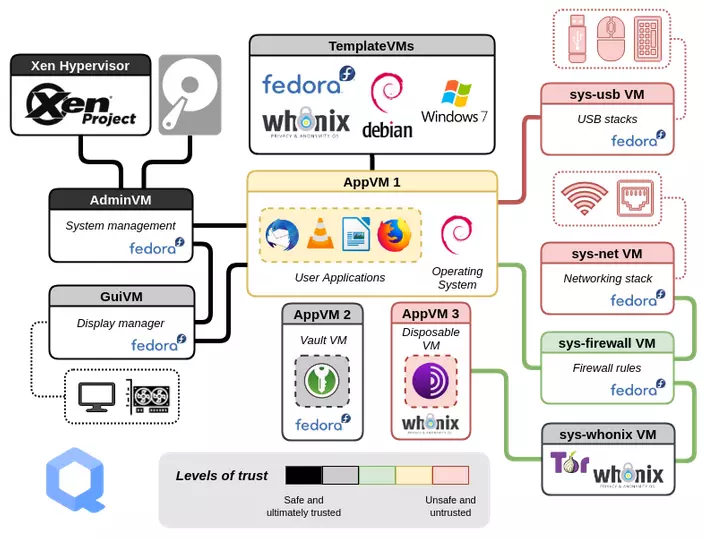
If you’re unfamiliar with this unique and “advanced” architecture, its terminology can initially feel overwhelming. What are Templates, Apps, Disposables, and Standalones, and how do they differ? There are several distinctions, and understanding them takes time. Here, I’ll focus specifically on filesystems and inheritance—two concepts that make software installation and general file management easier to understand.
File Systems
Every qube file system can be divided into two parts – the root and the home ~
- root, or
/– all of the files for the qube with the exception of the contents of/home - home, or
~or/home/<your_username>– all of your personal files and many local user configs, like~/.configand~/.local
Apps – These are what you do persistent work in that doesn’t require a persistent root. Hence, App qubes have a persistent home and a volatile root. If you put files/malware in your /home folder, they persist even after shutdown. If you install software/malware elsewhere in the filesystem, it is wiped at shutdown.
Disposables – Short-lived, throwaway qube for opening untrusted files, browsing risky sites, or testing software. These have both a volatile home and root. The use cases are endless, and the benefits are clear.
Standalones – Independent qube with its own complete root filesystem; useful when it must not inherit from a template. Standalone qubes have a non-volatile home and root, and are persistent in nature.
Templates – Stores the OS and installed packages used by AppVMs. You normally install updates and software here. The root and home of these qubes are persistent. This means that any changes are as permanent as normal VMs.
Qube OS Architecture
AppVMs
AppVMs are useful because they provide a practical balance between security, persistence, and convenience:
- Compartmentalisation: You can separate activities into different security domains—for example, personal browsing, work, banking, and untrusted web activity. If one AppVM is compromised, the other AppVMs are designed to remain isolated. qubes-os.org
- Persistent user data: An AppVM retains its own
/homedirectory and user files, so documents, browser profiles, and settings survive reboots. - Shared templates: Multiple AppVMs can use the same TemplateVM. You install and update common software in the template, avoiding duplicated operating-system files and simplifying maintenance.
- Different security policies: Each AppVM can have its own network connection, firewall rules, USB-device assignments, and other settings.
- Reduced exposure: You can keep sensitive data in a dedicated offline AppVM, such as a vault, while using separate AppVMs for Internet-facing tasks.
- Easy recovery: Because the root filesystem is supplied by the template, an AppVM can generally be recreated or reset more easily than a conventional full VM. Important files should still be backed up.
- Flexible organisation: You can use one AppVM for several related applications or create separate AppVMs when stronger separation is needed.
Templates
Software that you use in most everyday tasks, is installed within templates. When using Qubes OS, you normally work in app qubes. App qubes are based on a template qube (or more simply, just a template). They inherit most of the “root filesystem”, from the template.
The template system has significant benefits:
- Security: Each qube has read-only access to the template on which it’s based, so if a qube is compromised, it cannot infect its template or any of the other qubes based on that template.
- Storage: Each qube based on a template uses only the disk space required to store its own data (i.e., your files in its home directory), which dramatically saves on disk space.
- Speed: It is extremely fast to create new app qubes, since the root filesystem already exists in the template.
- Updates: Updates are naturally centralized, since updating a template means that all qubes based on it will automatically use those updates after they’re restarted.
In general, keep templates as minimal as possible and install only the software required by their associated AppVMs, as this reduces the overall attack surface. You can use multiple templates, each tailored to a specific purpose, or clone an existing template for a particular use case. However, creating additional templates also increases the number of systems that must be updated and maintained through the Update Manager.
Standalones
Standalone VMs in Qubes OS are useful when you need a qube with its own independent operating-system installation rather than one based on a TemplateVM.
Benefits include:
- Independent root filesystem: The VM has its own persistent root filesystem, so changes to installed packages, system configuration, and operating-system files are retained.
- No template dependency: It continues to work independently of a template, which is useful when a template is unavailable, unsuitable, or should not be shared.
- Custom operating systems: Standalones are appropriate for operating systems or distributions that do not support the usual Qubes template model.
- Greater customisation: You can modify system files, kernels, services, drivers, and package sources without affecting other qubes.
Disposables
Now, let’s move on to my favourite type: Disposable VMs
These have many benefits, such as:
- Strong containment: They provide an isolated environment for risky or untrusted activities, such as opening suspicious attachments or visiting unfamiliar websites.
- Automatic cleanup: The DisposableVM and its changes are deleted when it is shut down, reducing the chance that malware or unwanted files will remain.
- Reduced persistence: Downloads, browser history, cookies, configuration changes, and installed software are normally discarded when the disposable is closed.
- Safe file handling: You can open an untrusted document in a DisposableVM without exposing your main working environment directly.
- Fresh environment: Each new disposable starts from a clean state based on its source qube or template.
- Convenient temporary workspaces: They are useful for one-time browsing, testing software, previewing files, and handling content that does not need to be retained.
- Reusable disposable profiles: You can configure DisposableVM settings or create disposables based on specific AppVMs or templates for different purposes.
These will likely be among the most frequently used qubes and are recommended for most routine and trivial tasks that do not require a persistent environment. Because they are discarded afterward, they help keep the system clean and reduce the risk of lingering threats.
That brings us to the end of this blog post. I hope it has given you a clearer understanding of Qubes OS architecture and how its different qube types work together.
Stay smart, stay safe, and enjoy using Qubes OS 🤓🙂